
Even with rapid advances in event mobile applications, event management software, hybrid event tools, and conference mobile apps, event planners in 2026 still face frustrating technical challenges. From low attendee engagement to check-in failures, unstable Wi-Fi, schedule conflicts, and login errors, these problems can derail an otherwise well-planned event.
The good news?
Most event app issues are preventable, and nearly all can be fixed within minutes when you understand the root causes.
This guide covers the 15 most common event app problems in 2026, along with proven solutions you can implement instantly. It is designed for conference organizers, associations, enterprise teams, nonprofits, and anyone using event apps like Grupio’s event management system.
Let’s start troubleshooting.
1. Low Attendee App Adoption
Problem:
Attendees aren’t downloading or using your app.
Why It Happens:
- Late promotion
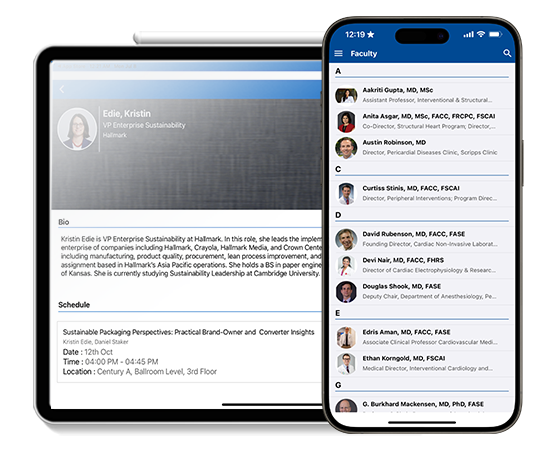
- Confusing download instructions
- Poor Wi-Fi
- Too many steps to log in
Fix:
✔ Promote the event mobile app 30–45 days before the event
✔ Add QR codes for instant download
✔ Add the app link inside all confirmation emails
✔ Enable SSO (Single Sign-On) or guest login
✔ Offer small incentives (badges, points, giveaways)
2. Attendees Not Receiving Push Notifications
Problem:
Alerts aren’t being delivered during the event.
Causes:
- Notification permissions disabled
- Device battery optimization blocking background activity
- Too many notifications causing user fatigue
Fix:
✔ Ask attendees to enable notifications during check-in
✔ Limit pushes to high-value, time-sensitive updates
✔ Use segmented notifications for specific groups
✔ Re-send critical reminders twice before the session
3. Slow or Failing Wi-Fi at the Venue
Problem:
Event apps lag or fail to load during sessions.
Why It Happens:
- Too many users on one access point
- Large file sizes
- Poor venue network planning
Fix:
✔ Use event apps with offline mode (Grupio supports this)
✔ Provide downloadable PDFs for agenda
✔ Use Wi-Fi heat maps to plan coverage
✔ Ask venue for “event-grade Wi-Fi” specifications
✔ For large expos, request dedicated bandwidth
External best practices:
General Wi-Fi recommendations from network engineering principles (IEEE standards).
4. Check-In Bottlenecks & QR Code Failures
Problem:
Attendees form long lines because scanning is slow.
Causes:
- Poor lighting
- Weak internet connection
- Damaged QR codes
- Attendees not prepared
Fix:
✔ Add multiple scanning stations
✔ Train volunteers before doors open
✔ Move scanning near strong lighting
✔ Allow manual search by name as backup
✔ Use apps with offline QR scanning
5. Duplicate Registrations Appearing in App
Why It Happens:
- Syncing multiple registration sources
- Manual imports without cleanup
Fix:
✔ Sync registration only from one primary platform
✔ Run duplicate cleanup before import
✔ Map fields correctly to avoid mismatch
✔ Schedule automatic syncs (every hour)
6. Session Overlaps & Incorrect Scheduling
Problem:
Times appear wrong or overlapping.
Possible Causes:
- Time zone mismatch
- Manual copy-paste errors
- Multiple editors overwriting data
Fix:
✔ Ensure the event time zone is consistent across all platforms
✔ Use dedicated schedule tools (Grupio’s agenda builder)
✔ Assign one “schedule owner” to prevent conflicts
✔ Perform a schedule audit 24 hours before launch
7. Exhibitor or Sponsor Information Not Showing
Problem:
Profiles, logos, documents, or videos fail to load.
Fix:
✔ Compress images to recommended file sizes
✔ Upload sponsor files at least 72 hours before event
✔ Use stable internet when updating content
✔ Enable caching inside the event mobile app
8. Engagement Tools Not Working (Polling, Q&A, Surveys)
Cause:
- Poor Wi-Fi
- Polls not activated
- Attendees unaware of feature
Fix:
✔ Send a push notification announcing the poll
✔ Display a QR linking directly to poll/survey
✔ Make polls short (1–3 questions)
✔ Conduct a pre-event poll to warm up attendees
9. Attendees Cannot Log In
Root Causes:
- Wrong email entered
- Registration not synced
- Password reset failure
Fix:
✔ Enable SSO or OTP login
✔ Add a “Login Help” button on the app home screen
✔ Sync registration two hours before doors open
✔ Provide an onsite digital help desk
10. Speaker Profiles Missing or Incorrect
Problem:
Speaker bios, photos, or session links are missing.
Fix:
✔ Use a database-driven CMS (like Grupio)
✔ Standardize image size requirements
✔ Ask speakers to submit info via a structured form
✔ Review content one week before the event
11. Attendee Tracking Not Working (RFID/QR/NFC)
Possible Reasons:
- Faulty reader devices
- Low battery on scanners
- Attendee badges printed wrong
- Wrong tag pairing
Fix:
✔ Test all scanners one day before
✔ Ensure badges have high-contrast print
✔ Position scanners at correct height
✔ Use fallback tracking (manual check-in)
12. Hybrid or Live Stream Not Accessible
Problem:
Virtual attendees can’t join or video freezes.
Fix:
✔ Share one universal join link
✔ Avoid last-minute platform switches
✔ Test streams with speakers in advance
✔ Reduce bitrate for attendees with weak connections
✔ Provide a “Replay Available Soon” fallback
General industry guidance:
Adhere to RTMP best-practices for stable streaming.
13. App Freezing or Crashing During Event
Why It Happens:
- Outdated OS version
- Heavy content (large PDFs, videos)
- Poor memory management on older devices
Fix:
✔ Encourage attendees to update the app pre-event
✔ Replace large PDFs with short summaries
✔ Avoid uploading oversized media files
✔ Restart devices before entering the venue
14. Poor Analytics or Missing Data
Problem:
Session attendance or engagement numbers appear inaccurate.
Fix:
✔ Enable analytics before publishing the schedule
✔ Ensure QR/attendance scanning is mandatory
✔ Use clear naming conventions for sessions
✔ Export data daily for backup
✔ Sync data only from verified sources
15. Attendees Struggling to Navigate the Venue
Problem:
Users can’t find rooms, halls, or booths.
Fix:
✔ Use digital maps and wayfinding
✔ Send pre-event “What to Expect” guides
✔ Label floors and rooms consistently
✔ Add push notifications before major sessions
✔ Position volunteers at key transitions
In most cases, event app issues are not caused by the software itself, but by overlooked setup steps, last-minute content uploads, venue-related technical limitations, or attendee device settings. This is why planners in 2026 must treat their event mobile app as a core part of the event infrastructure—just like AV, venue layout, or registration. When planners review their app setup, test features early, communicate clearly with attendees, and follow a troubleshooting checklist, the entire event experience becomes smoother, faster, and more predictable for everyone involved. Fixing these common issues before doors open not only improves attendee satisfaction, but also increases engagement rates, sponsor visibility, and the overall ROI of the event.

Zeena Awan is a dynamic Senior Project Manager at Grupio, recognized for her proven ability to lead complex, large-scale projects from inception to successful delivery. With extensive experience in project planning, execution, and process optimization, she excels at streamlining workflows, aligning cross-functional teams, and driving efficiency across operations.
Zeena is highly regarded for her strategic problem-solving skills, strong leadership, and commitment to excellence, consistently ensuring projects are delivered on time and to the highest standards of quality. At Grupio, she plays a pivotal role in enhancing operational processes, fostering collaboration, and implementing scalable solutions that align team performance with organizational goals. Her focus on both client satisfaction and team success has positioned her as a trusted leader in ensuring seamless project outcomes.